A budget shows what you already spent. This shows what you can spend right now — one clear number. It uses the money you have, the pay you got, what you've spent, and the bills still coming before payday.
You don't need to be good at money.
You check your bank. There is money in it. But you still don't know if you can spend it tonight. Some of that money is already needed for a bill that hasn't come yet.
It looks okay. But a bank balance is just a number. It doesn't tell you what you can spend.
Take out the bills. See what's left. Split it over the days to payday. You do this again and again.
So you spend nothing, or you spend too much and feel it on payday. Neither one is a plan.
Most sheets look back at a month that is gone. This one answers a question you have today, before you spend.
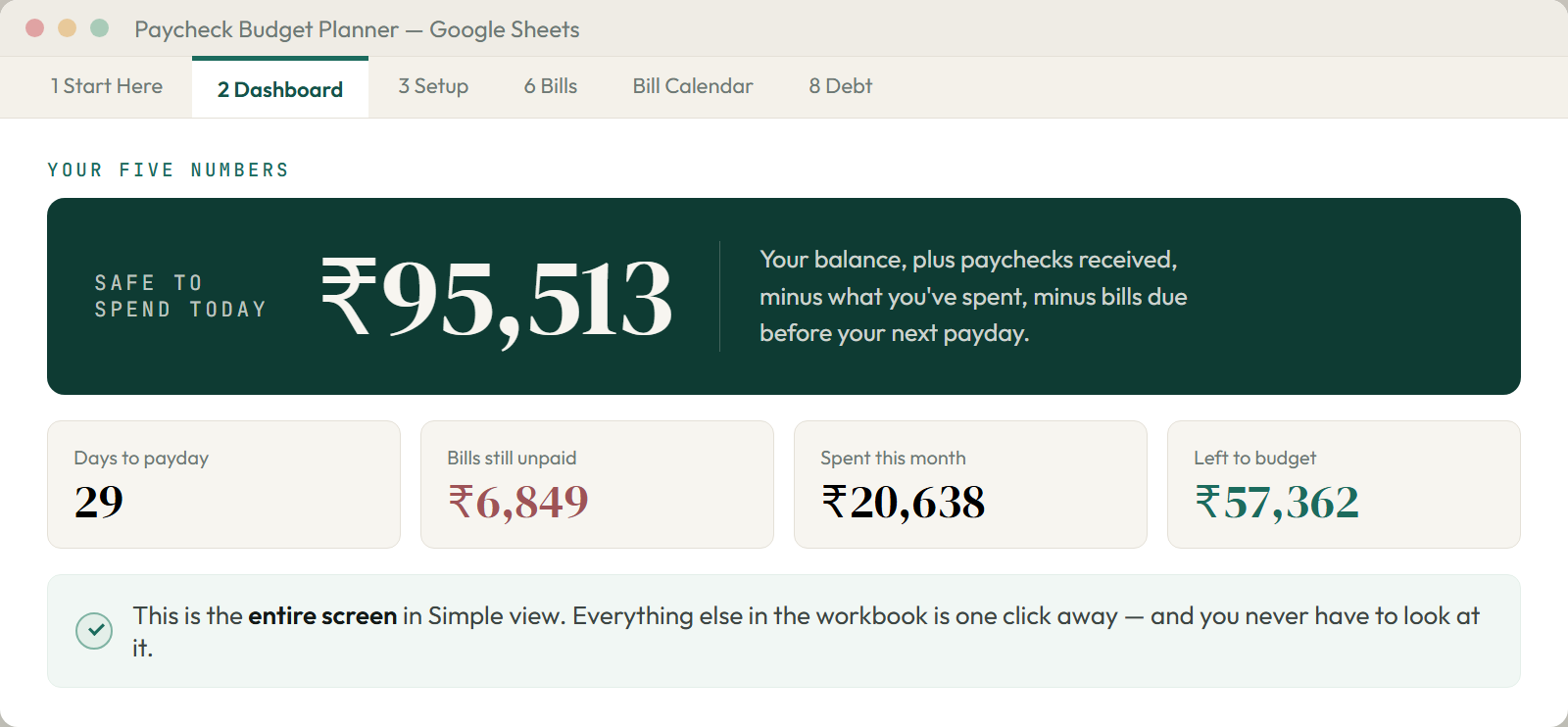
The file opens with an example already filled in. So you can watch it work before you put in your own numbers. This is the whole screen in Simple view.

Simple view shows one number. Full view shows the math under it too. Same file, your choice — and you can switch back and forth any time with one dropdown.
Everything that does the math is locked. You cannot break a formula by mistake. And there is no password, so you can unlock it any time you want.
When you are ready to use it for real, set Example data to No on the Setup tab. Every sample row clears at once.
Put the file in Google Drive and open it in Sheets. Or just double-click it in Excel. Both are tested.
Everything in the file is built to answer one of these. Nothing is there just because a money book would add it.

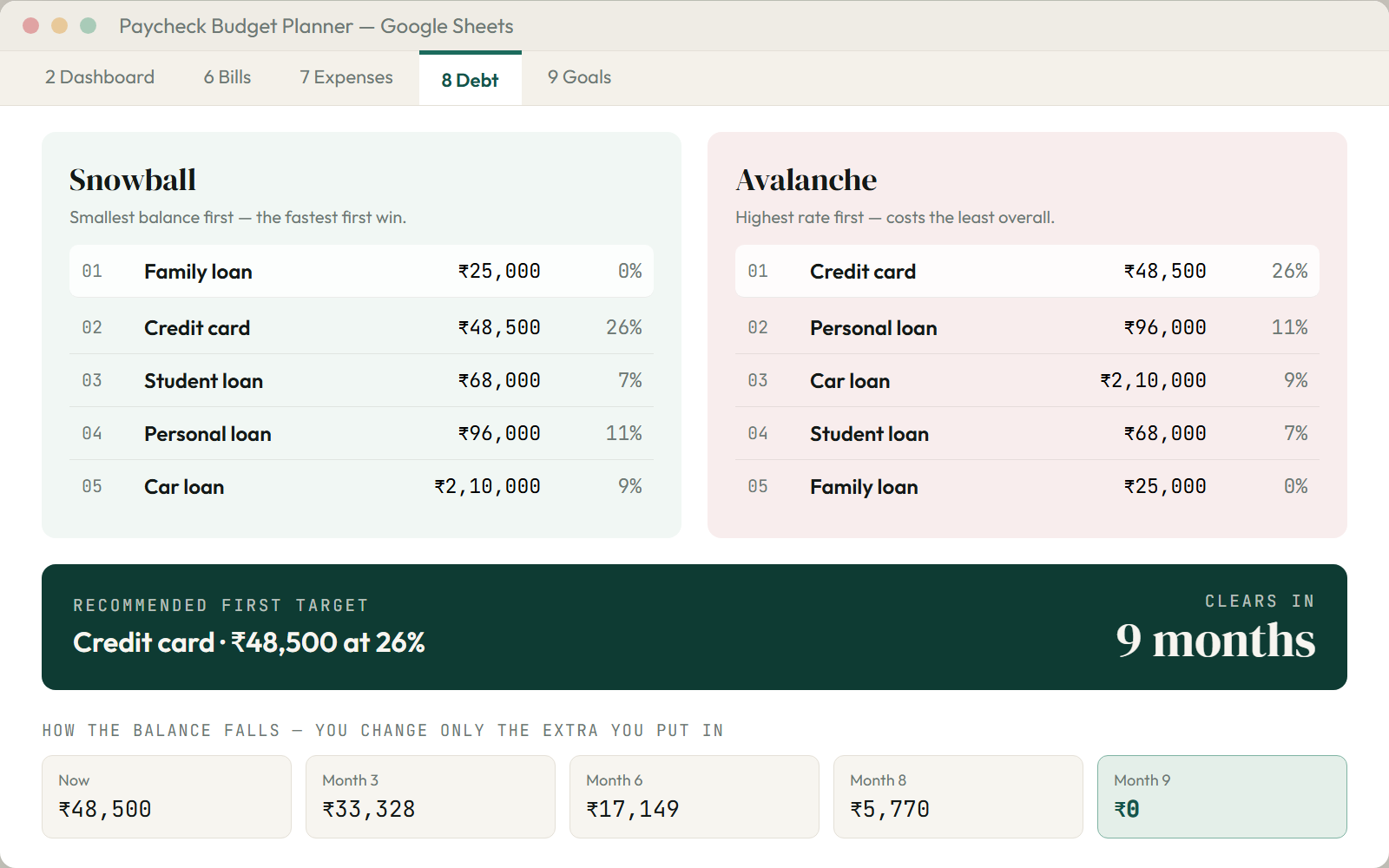
Put in what you owe and the rate. The file ranks your debts two ways — smallest first, and highest rate first — and works out how many months the one it picks will take to clear with the extra you pay.

No formulas to learn. No empty grid to stare at. It opens already working.
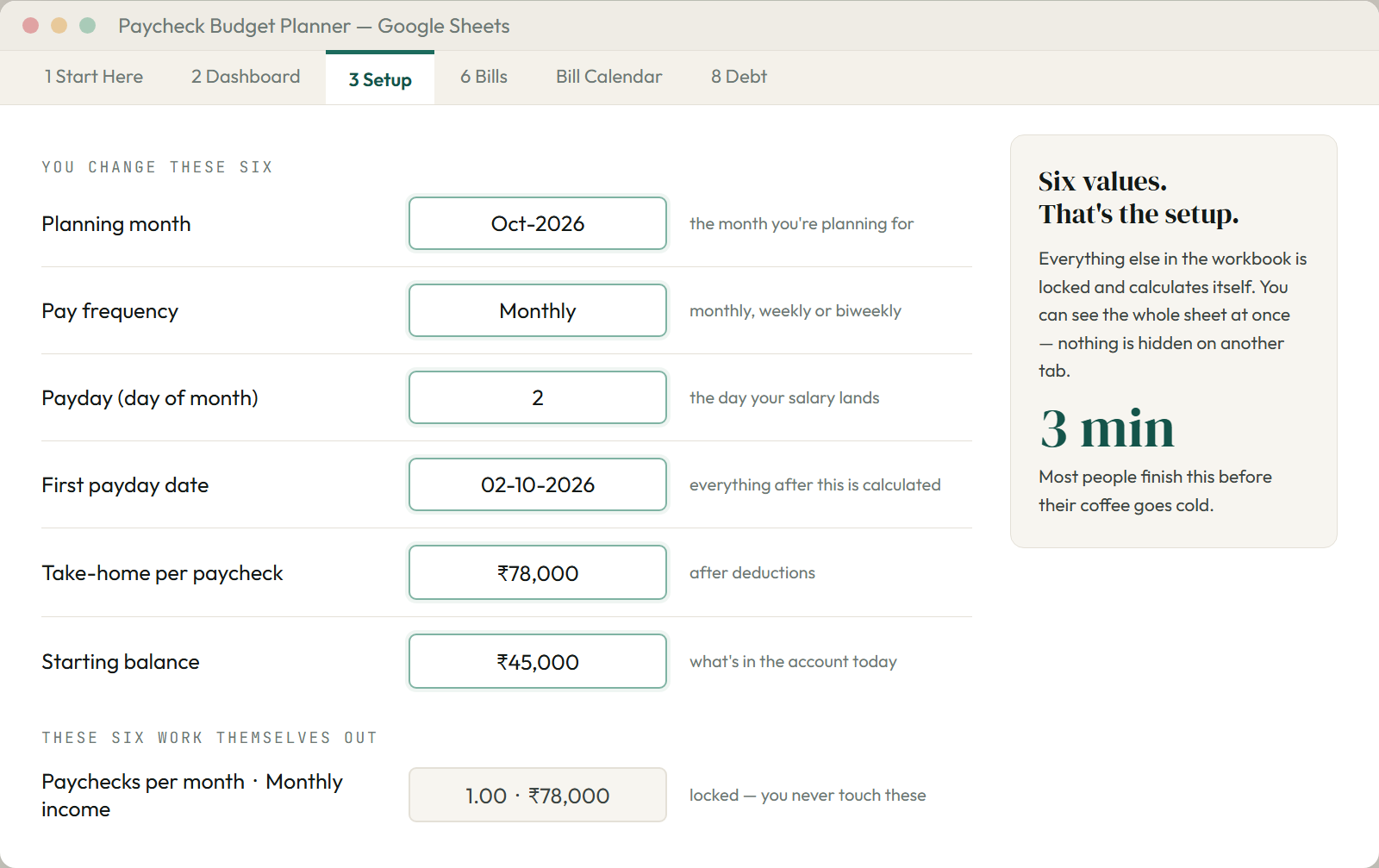
How often you are paid, your payday, your next payday, your take-home pay, your starting balance, and the month you are planning. Everything below that works itself out — you never touch it.
The Dashboard shows Safe To Spend at the top and four more numbers under it. Switch it to Simple and that is the whole screen — nothing else to learn.
It comes with an example so you can see it work first. When you are ready, set Example data to No on the Setup tab and every sample row clears at once. Then just type.

You do not need any of this to use the file. But if you have bought a sheet before that broke the moment you typed in it, these are the numbers I would want to see.
0 came back as an error.no password, so Review > Unprotect Sheet opens it right away if you want to change something.SafeToSpend, not cell numbers. Add a bill on any row and nothing else breaks..xlsm. It is a plain file that opens like a plain file.This part sits down here, not at the top, for a reason: none of it helps you decide to buy. It just helps you stop worrying that the file is weak. If you would rather skip it, go to setup — it takes three minutes.
There are. Here is the honest side-by-side, including where the free one wins.
| This planner | Most paid sheets | Free Google / Canva sheet | |
|---|---|---|---|
| Tells you "what can I spend today?" | Yes — that is the whole point | No | No |
| Opens in Microsoft Excel | Yes — tested in both | Most don't | No |
| Real due dates, not day-of-month | Yes, DD-MM-YYYY | Sometimes | No |
| Works for weekly / two-week pay | Yes, 52 paychecks | Rarely | No |
| Ranks which debt to clear first | Yes, both ways | No | No |
| Made for ₹ / UPI / card EMI | Yes, ready to go | No | No |
| Comes with an example filled in | Yes | Some | No |
| Formulas locked from mistakes | Yes, no password | Some | No |
| Look and feel | Careful | Very mixed | Usually rough |
| Price | ₹299 | ₹78–₹331 | Free |
Where the free one wins: it costs nothing, and if you only want to track one thing, it is really enough. This is for the person who has tried that and ended up back where they started.
Not from a spec sheet I wrote months ago. This page is built from the file itself. So if a number here did not match what you see when you open the file, that would be my mistake — and you could prove it in under a minute.
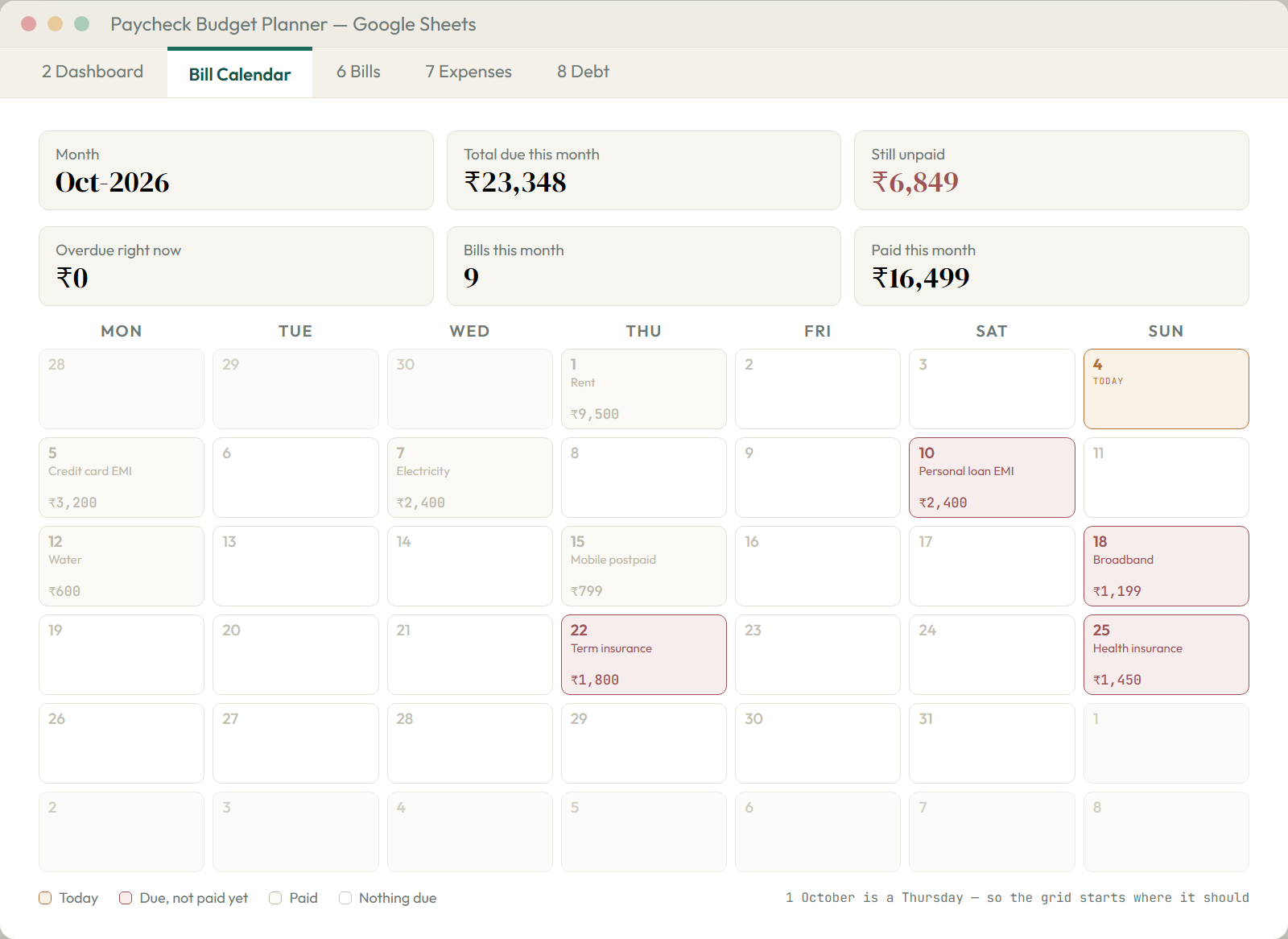
I also opened it in real Microsoft Excel, instead of just trusting that a tidy file is a working file. "It opens" and "it opens with no repair pop-up" are two different things. The bill calendar is checked against the real weekday of every date across fourteen months. So the 1st lands under the right day whichever month you pick.
And there is no review on this listing yet, because it is new. I am not going to make one up, or hint at sales I do not have. So judge the file instead — it is yours in three minutes, and if it does not give you a clearer answer than the one you had this morning, you get your money back.
Your bills use real dates, not a fixed "day of the month". So they need to be moved forward each month. That is the honest cost of being exact: a bill on the 31st does not fall on the 31st every month, and a one-time charge should land in the month it is really due.
It takes about thirty seconds. Move Planning month forward on Setup, paste this into any empty column on the Bills tab, and drag it down:
=IF(F5="No",DATE(YEAR(D5),MONTH(D5)+1,MIN(DAY(D5),28)),"")
Copy the results and paste-special values back over the Due date column. Paid bills skip themselves. The MIN(DAY,28) part stops a 31st bill from breaking in a short month. Every total, chart and your Safe To Spend number updates itself.
Every line below is something you would otherwise have to find, build, or talk yourself into.
About the cost of one takeaway dinner — and about one second of your monthly pay. It will either tell you what you can spend this month, or it won't.
Get the plannerIf it did not give you a clearer answer than the one you had before you opened it, email me within 30 days and I will refund you in full. No forms, no reason needed. The file stays yours either way.
About three minutes between you and a number you can trust. It works in Google Sheets and Excel, and it comes already showing you how it works.
Get the planner — ₹299Instant download · Works in Sheets and Excel · 30-day money-back guarantee